
Settings
Flavours
Depending on the available blueprints on a platform, you can select flavours which are feature configurations for blueprints. Flavours determine what features and configurations are enabled on an app.
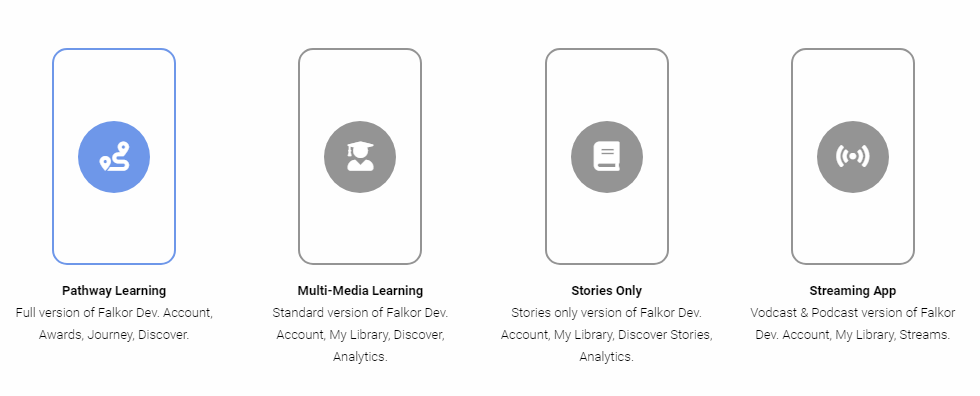
If your app is already published, you can change flavours without re-deploying. Once a flavour is changed the new configuration will be used when a web app refreshes or app restarts.
Access Options
In the Access options you may determine how an app can be accessed. There are two options:
Public App Any user can sign up and register on the app. Invite Only User must have been invited to the app via Groups.
If your app is published, you can change access options without re-deploying. However if you change to invite only from public you may need to resend app invites that have not activated. This is due to invite only apps requiring an activation code.
Discover Options
Customise the Discover section on the app. You can can activate and deactivate Streams, Stories and Pathways
Discover: Stories Disabling this option will hide stories in the discover section.
Discover: Streams Disabling this option will hide streams in the discover section.
Discover: Pathways Disabling this option will hide pathways in the discover section.
General Options
Suspend Mode Switching this option on will show a suspend notice on the app.
Maintenance Mode Switching this option on will show a maintenance notice on the app.
Custom Field Specify a custom profile identifier field such as POS, Employee or Passport number.
Advanced Network Options
Advanced Network Options should NOT be changed unless there is custom configuration for an app such as data free domain or custom integrations.
As general rule leave these settings as is.
Last updated